Remote Display
A small touch screen that shows the cover of whatever is playing, and can change it (ADR-0020). It is a stand-alone display and remote: for simple things, play or pause, back and next, it is handier than the phone app, and it is a way to enjoy the cover art in another room.
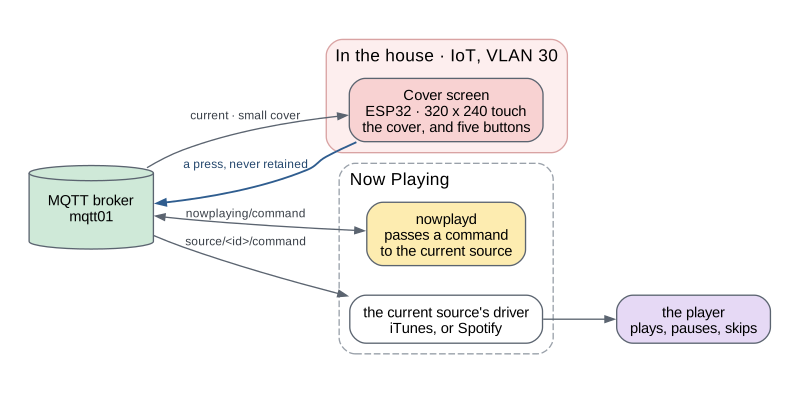
Components
- The cover screen: an ESP32-2432S028R, a 320 by 240 touch panel with no external memory. It shows the small cover and the title, draws buttons when the source can take commands, sends what is pressed, and sleeps when nothing plays.
It is one component today. A second screen, or a remote of another kind, would join it here; so would a portable screen with ears built in, which is meant for later.
Outside services
None of its own. A press for Spotify reaches Spotify’s servers through Now Playing’s Spotify driver, not from the screen.
What it shows
The screen reads two of Now Playing’s topics, current and the cover at
240 pixels, current/art/small. A whole frame would not fit in its memory,
so nothing on it holds one: the cover is decoded a row of blocks at a time,
and the buttons are painted into each row as it passes. With no cover, it
shows a drawn record, its label lit while something plays.
What a touch does
The cover is the screen; nothing is drawn over it until it is touched. The first touch brings up five buttons: play or pause, previous, next, volume up and volume down. The whole screen is a button, so a finger does not have to find the icon. The buttons go away five seconds after the last touch.
A press goes one way, and it is the same for every controller:
- The screen publishes a command, such as
next, toeds/nowplaying/command. It does not know what is playing. nowplaydpasses it to the command topic of whichever source is current.- That source’s driver carries it out: iTunes over its pairing, Spotify through its Web API.
A command is never retained, and the screen never queues one: a press delivered after a reconnect would skip a track nobody asked to skip.
When there is nothing to control, it offers nothing. For a record,
current says there are no controls, and a touch does nothing
(ADR-0025).
The screen is told there is nothing to offer, not why: it knows no player,
and does not know the word “turntable”.
It sleeps when nothing plays
Five minutes after current last said something was playing, the panel
goes dark
(ADR-0036).
Playing wakes it, and so does a touch, which only wakes it. Losing WiFi or
the broker wakes it too, with a corner marked red or amber, so dark always
means asleep and never broken.