Subsystems and Components
EdS is one system made of subsystems, and each subsystem is made of components.
| Term | What it is | Example |
|---|---|---|
| System | EdS as a whole: everything here, and the bus it meets on | EdS |
| Subsystem | something a person in the room experiences from end to end, with a name of its own | the LP Light Show |
| Component | one program or one device, built, tested and deployed on its own | lightd, the LP stand |
A subsystem is named for what it does for a person, not for the parts it is made of. The LP Light Show is a stand that glows in the colors of the record; that it takes a Go service, a Python service and an ESP32 to do it is the subsystem’s own business.
Every component belongs to exactly one subsystem, or to the foundation they all stand on. A component that seems to belong to two is usually two jobs in one place, and is a sign that a boundary has been drawn in the wrong spot.
The subsystems
| Subsystem | What a person sees | Components |
|---|---|---|
| Now Playing | nothing directly: it is what every other subsystem knows about the music | the drivers, the recognizer, the power beacon, nowplayd |
| LP Light Show | the LP stand lit in the colors of the record on the turntable | lightd, palette, the LP stand |
| Remote Display | a screen showing the cover, with buttons to pause, skip and set the volume | the cover screen |
| Voice Request | an album played because someone asked for it out loud | the ears, voiced, scribe, the library index |
Beneath them is the foundation: the broker, the console, updates, logs, and where it all runs.
Each subsystem has a page of its own, with a picture of its components and how a piece of music moves through them.
The system, as it is running
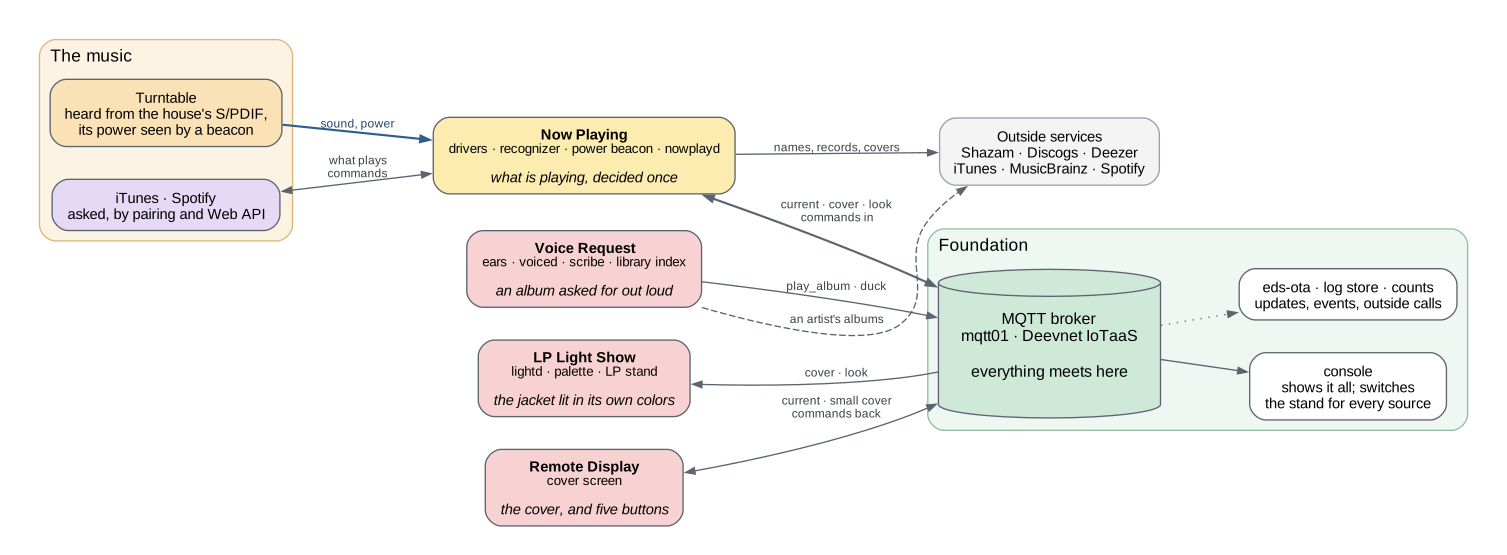
One box for each subsystem, naming its components. Read it left to right: where the music comes from, Now Playing deciding what it is, the broker where everything meets, and the subsystems that act on it. Each subsystem’s page has the detailed picture. Select this one to see it at full size.
The heavy blue line is sound; a dotted one is events, on their way to the log store; the dashed one is a call to an outside service. Gray boxes are someone else’s service.
The foundation
What every subsystem stands on, and that no subsystem owns.
- The broker (
mqtt01, Deevnet IoTaaS’s): where everything meets. - The console: the page a person looks at, showing every subsystem at once (ADR-0018). It subscribes to all of it and serves one page: the track, the sleeve, the sources, the devices, and the strip drawn as the stand is drawing it. It switches two settings: whether the stand is lit for records only or for every source (ADR-0039), and whether Spotify is followed at all (ADR-0051).
- Updates (
eds-ota): new firmware for every device, through the broker; a build that cannot reach the broker is undone (ADR-0035). - Events: the devices and the agent Pi send a few events each (boot,
network, scenes, health) to
eds/log/<id>, which Deevnet IoTaaS carries into the tenant’s log store, where Grafana reads them (ADR-0005). - Counts: every call to an outside service is counted, a minute at a time, and graphed on the Outside Services dashboard (ADR-0027).
- Where it runs: the tenant’s services workload, the agent Pi, their images and their deployment.
Why the broker is not in the tenant
mqtt01 lives on Deevnet IoTaaS’s IoT Backend segment (VLAN 35), not on
a tenant VM, and the devices sit on the IoT segment (VLAN 30).
That placement is forced rather than preferred. MQTT clients always dial the
broker — the ESP32 initiates, never the reverse — so whichever segment holds
the broker must accept inbound. The tenant fabric has no inbound path by
design: Deevnet ADR-0003 delivered egress only, and Deevnet ADR-0001’s
central promise is that the core router never learns tenant address space.
IoT Backend is the segment already defined to accept exactly this, with
mqtt01 named in the model as its typical inhabitant.
Putting the broker on a tenant VM would mean inventing an inbound path to tenant address space. That is an ADR, not a config change (ADR-0003).
How subsystems meet
Subsystems meet only where components do: at the broker, on topics. Nearly all of it goes through Now Playing. The LP Light Show and the Remote Display read what it publishes; the Remote Display and Voice Request send it commands. No subsystem subscribes to another’s internal topics, and none knows another is there.
That is what lets a subsystem be added, changed or switched off without the others noticing. The LP Light Show was running before the Remote Display existed, and Voice Request was added without either of them changing.
Adding a subsystem
A new subsystem starts with a name, for what it does for a person, a row in the table above, and a page of its own beside the others, with its picture. Then:
- Its components are its own. A component taken from another subsystem to save effort is a coupling that will have to be undone.
- It reads from Now Playing what it can, and asks for what is missing there, not by subscribing past it.
- What it needs from another subsystem that is not already offered on a topic is a decision to record first. So is a new command.
The pictures are drawn by GraphViz from the .dot file beside each page.
Change one there and run make -C docs diagrams; both files are committed,
because the site is built without GraphViz.